
How to write a prompt in ContractHero
ContractHero’s Contract Analysis feature leverages AI to automate and streamline the process of extracting key data from contracts. Here's an in-depth look at how it works and how to optimize the prompts for better results:
Automated Data Extraction:
ContractHero’s AI-powered tool extracts critical contract information such as dates, parties involved, and financial terms from uploaded documents. This process saves time and eliminates manual data entry.
Contract Analysis Process:
- Document Upload: The user uploads the contract document into the system.
- OCR (Optical Character Recognition): The system first uses OCR technology to convert the text in the contract into a machine-readable format, ensuring that even scanned or image-based documents are accessible for analysis.
- Custom Field Data Extraction: The AI extracts information based on predefined custom fields. These fields are tailored to the specific category of the contract, ensuring that only the relevant data is pulled for that particular contract type.
- AI Request Breakdown:
- Contract document text: The raw text extracted from the contract.
- Field name: The designated label for the data being requested (e.g., "Start Date").
- Field type: The format of the expected data (e.g., date, number, text).
- Field prompt: A clear instruction that defines what the AI is looking for within the contract.
- Based on this structure, the AI delivers a result by scanning the contract document and matching the information with the prompt and field type.
Context and Setup:
This information is already provided by ContractHero and does not need to be included in the custom field prompt.
- Task Guidance: The AI model receives essential details about the task at hand, such as which contract category it is working with, ensuring the extraction is tailored to the specific document type.
- Field Formatting: Data extracted is formatted according to the defined field type (e.g., date formats, numerical values).
- Organizational Context: The AI is also aware of the organization’s name to accurately identify the relevant clauses and sections in the contract where it should focus its analysis.
- Bilingual Support: ContractHero provides bilingual support, making it capable of analyzing contracts in both German and English.
Effective Prompt Writing:
To ensure that the AI returns accurate results, it's crucial to write clear and precise prompts. Below are tips for optimizing your prompts:
- Be Specific in Instructions:
- Bad example: “What date is written in the contract?”
- Good example: “What start date is written in the contract?”
- Clear, specific instructions help the AI focus on the right information.
- Provide a Detailed Description of the Value:
- Bad example: “When does the contract start?”
- Good example: “What is the start date of the contract? Often found under 'contract term' or 'contract duration'."
- The more context you provide, the better the AI can locate the right data.
- Ensure Consistency in List Values:
- Bad example: The list of options contains "Car" and "Coffee machine", but the prompt asks: "Select cars for a vehicle leasing contract"
- Good example:
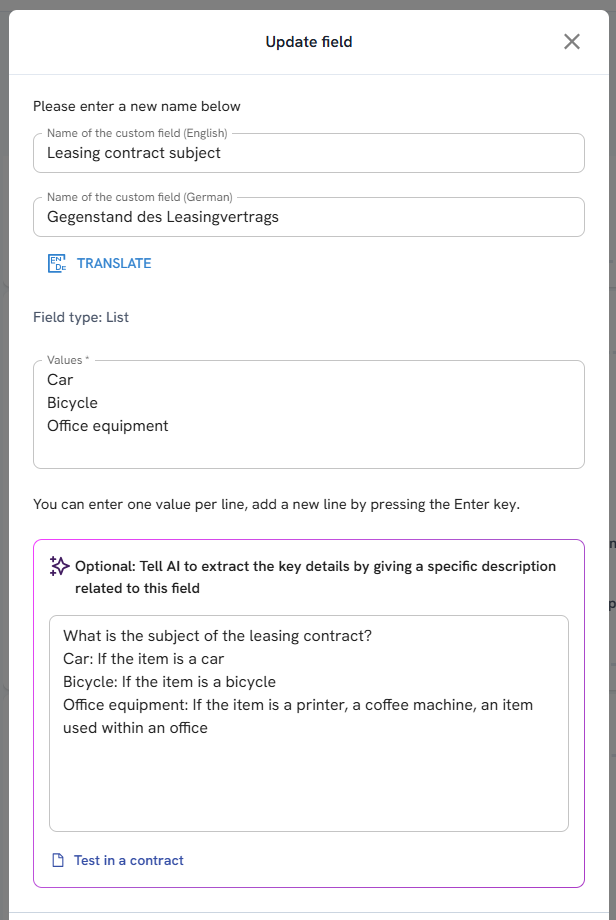
- The prompt and the list of acceptable values should match exactly to avoid confusion and ensure the AI extracts the correct response.
- Field Name Alignment:
- Bad example: The field name is "payment" but the prompt asks about "salary".
- Good example: Ensure the field name aligns with the prompt. If the field is "payment", the prompt should refer to “payment” and not “salary”.
- Consistent terminology between the field name and prompt ensures accurate data extraction.
- Use of examples
- Example: "What is the termination date of the contract? This is often listed at the end of the agreement or in Section 8 titled 'Termination.'"
Updated on: 04/30/2025
Thank you!